


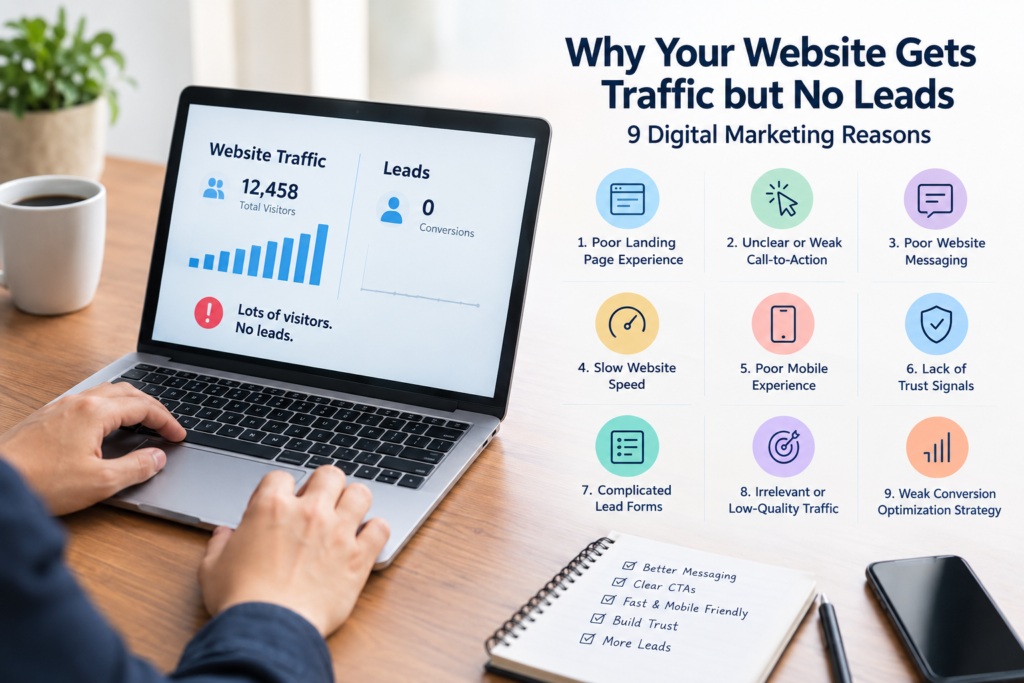
Good traffic numbers feel like a win. Rankings are up, ads are pulling clicks, social posts are getting shared. Then the inquiries don’t show up. The phone stays quiet, forms sit unopened, and the sales team keeps asking where the leads are.
That gap is common, and it comes down to one thing: traffic and conversions aren’t the same metric. Traffic counts arrivals. Leads count people who actually did something once they got there. A site can rank well and still fail at conversion, because ranking and converting solve different problems. If website traffic but no leads sounds familiar, the fix usually starts on the page itself, not in the search results.
Here are nine reasons this happens, and what actually helps.
The problem: Visitors land somewhere that doesn’t match what they were looking for, or it looks dated and takes too long to make its point.
Why it hurts conversions: Landing page conversion lives or dies in the first few seconds. A cluttered or confusing page loses people before they get anywhere near a form.
How to spot it: Look at bounce rate and time on page for your top landing pages. High bounce paired with low time on page is usually a mismatch between expectation and reality.
How to fix it: Keep the top of the page focused on one message, cut navigation that pulls attention away from the goal, and build pages around a single offer rather than trying to cover everything at once. Focused pages convert better, consistently.
The problem: Visitors don’t know what to do next. Buttons say “Submit” or “Click Here,” or there are so many of them that none stands out.
Why it hurts conversions: Call to action optimization is one of the easiest things to get wrong and one of the fastest to fix. Vague labels give people no reason to click.
How to spot it: Check click-through rates on your CTA buttons, or run a heatmap. Decent traffic with low interaction almost always points here.
How to fix it: Write CTAs that name the benefit, like “Get a Free Quote” or “Book Your Consultation Today.” Make the button visually obvious, and don’t crowd the page with competing calls to action.
The problem: The homepage talks about the company instead of the visitor’s problem.
Why it hurts conversions: Website not generating leads is often a copy problem before it’s anything else. If someone can’t tell within a few seconds what problem gets solved for them, they leave.
How to spot it: Show the homepage to someone unfamiliar with the business for ten seconds, then ask what the company does. If they hesitate, the messaging needs work.
How to fix it: Open with the visitor’s problem, follow with the solution, back it up with proof. This kind of rewrite tends to move website conversion rate more than a visual redesign does.
The problem: Pages take too long to load, especially on mobile.
Why it hurts conversions: Every extra second of load time gives people another reason to bail before they see anything. It’s one of the more direct causes of website traffic not converting.
How to spot it: Run the site through Google PageSpeed Insights or GTmetrix on both desktop and mobile.
How to fix it: Compress images, trim unnecessary scripts, turn on caching, and use hosting that can actually handle the load. Shaving off even a second can move the needle on website leads.
The problem: The desktop version looks fine, but mobile feels cramped or breaks in places.
Why it hurts conversions: Most traffic now arrives on phones. Small text, awkward menus, and forms that are hard to tap all push people away.
How to spot it: Test the site yourself on a few different phones, and check mobile bounce rate separately from desktop.
How to fix it: Use responsive design, simplify mobile navigation, and make sure buttons and form fields are easy to hit with a thumb.
The problem: Nothing on the page gives visitors a reason to believe the business is legitimate.
Why it hurts conversions: Most people don’t convert on the first visit unless something reassures them quickly. No reviews, no certifications, no clear contact information, and doubt creeps in.
How to spot it: Compare engagement on pages with testimonials or reviews against pages without them.
How to fix it: Add real client testimonials, case studies, recognizable logos, and certifications where relevant, and make contact details easy to find. Putting a genuine review near a CTA often does more for lead conversion optimization than people expect.
The problem: The form asks for too much, too soon.
Why it hurts conversions: Every additional field costs completions. This is one of the more common website lead generation problems, particularly for service businesses.
How to spot it: Check form abandonment rates if tracking is set up, or just count how many fields are required.
How to fix it: Ask for the basics first: name, phone number, a short message. Save the rest for a follow-up call or email.
The problem: People are landing on the site who were never looking for what it offers.
Why it hurts conversions: Traffic can look strong while being largely off-target. This happens when SEO or ad targeting chases volume instead of intent, and it’s a direct cause of website visitors not converting.
How to spot it: Check which keywords or campaigns are bringing people in and match those against actual buyer intent. Informational searches rarely convert the way commercial ones do.
How to fix it: Tighten keyword targeting around intent-driven terms, adjust audience settings on ads, and build content around what real prospects are searching for, not just what gets the most volume.
The problem: Nobody is testing or reviewing how the site actually converts.
Why it hurts conversions: A lot of businesses treat the website as a finished project rather than something to keep improving. Small friction points pile up unnoticed without regular website conversion optimization.
How to spot it: Check whether any A/B testing, heatmap review, or conversion tracking has happened in the last six months. If not, that’s the gap.
How to fix it: Set up conversion tracking, test one element at a time (headline, CTA placement, form length), and review results monthly. Small, steady changes usually beat the occasional big redesign.
Website conversion rate is just the percentage of visitors who complete an action you care about, like filling out a form or calling, out of total visitors. A low website conversion rate doesn’t automatically mean the traffic is bad. More often it points to friction somewhere: messaging, speed, trust, or design.
Benchmarks vary by industry, but many service-based sites fall somewhere between two and five percent. Anything well below that is worth a closer look using the reasons above.
few things consistently help increase website leads:
These work best combined. Conversion problems are almost never caused by just one thing.
A simple process to figure out why website gets traffic but no leads:
This usually narrows things down to two or three real issues, not a full rebuild.
A few “no” answers point straight to where the leads are getting lost.
Why does a website get traffic but no leads?
Usually a mix of unclear messaging, weak CTAs, a rough mobile experience, or traffic that doesn’t match what the site actually offers.
How can website conversion rate improve quickly?
Start with the highest-traffic pages. Clearer CTAs, shorter forms, and visible trust signals often show results within weeks.
Does more traffic fix low leads?
Not on its own. More traffic on a site with existing conversion problems usually just means more people leaving without converting.
What counts as a good website conversion rate?
Somewhere between two and five percent for many service businesses, though it depends heavily on industry and traffic source.
How often should conversion issues be reviewed?
Quarterly at a minimum. Sites running paid traffic benefit from checking monthly.
Website traffic but no leads rarely comes down to one mistake. It’s usually a handful of small frictions, unclear copy, a slow load, a form that asks too much, that quietly add up until visitors leave before they act. None of this usually calls for a full rebuild. Clearer messaging, simpler forms, faster pages, and a genuine sense of what visitors need to feel confident are often enough.